
This post is about using Telegram bot to remotely control ESP32 microcontroller to on/off 4 LEDs. Please watch my YouTube video below, for better understanding of this project. I learn this project from John Boxall book, Arduino for Arduinians – I encourage all beginners Arduino / microcontroller geeks to check out this book.
To set up Telegram bot account:
- Set up a Telegram account if you do not have one ( your personal account).
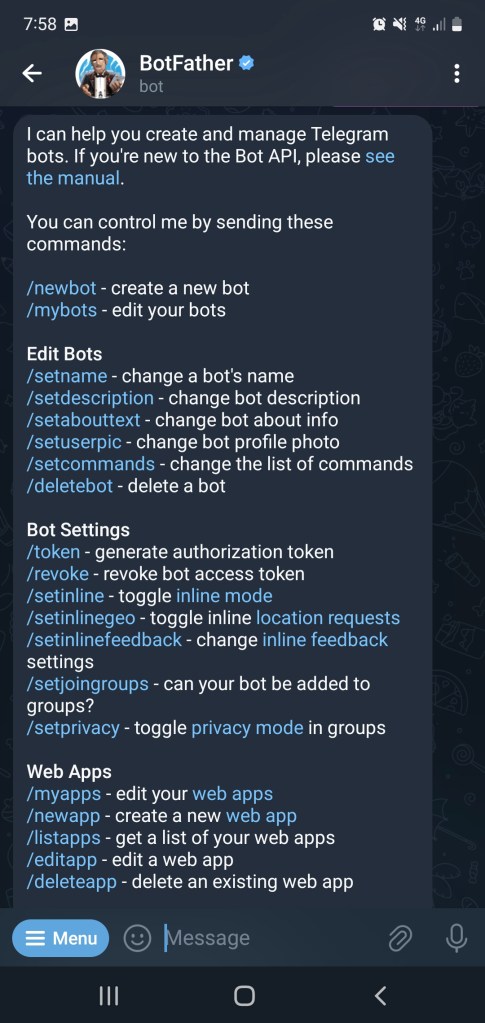
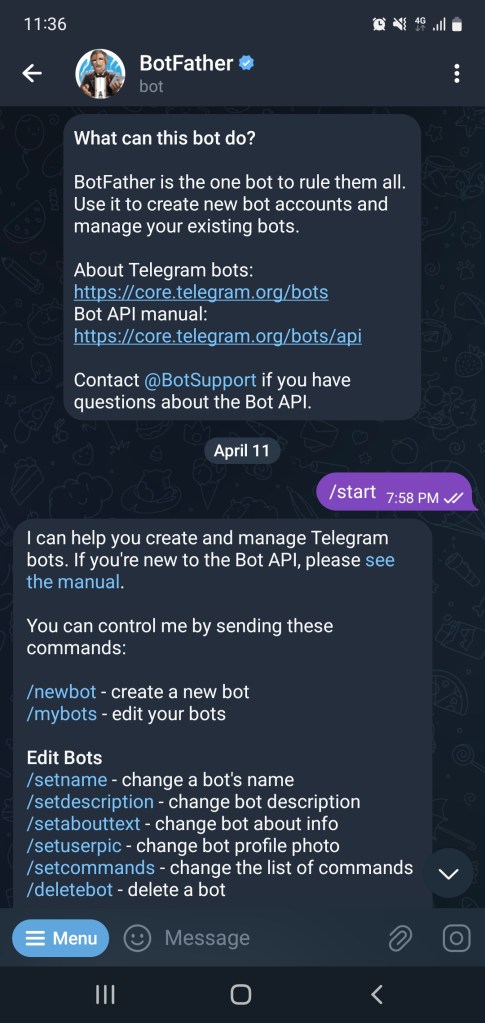
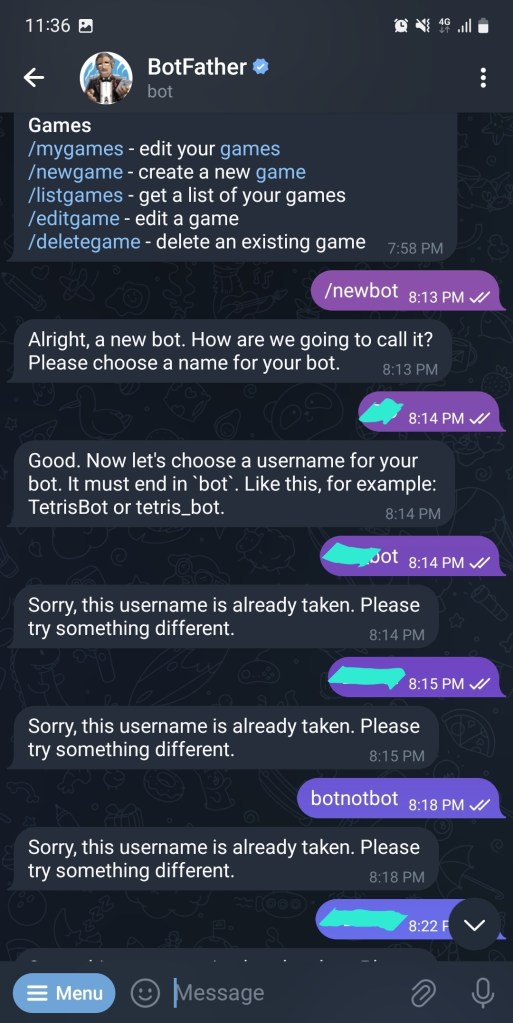
- Then Set up the Telegram bot account ( this is a bot account to control the ESP32 remotely) Refer to below pics on how to setup bot account.
- Using your personal account and search for “BotFather” ( with the blue tick besides the account name)
- Click Start and select “/newbot”.
- Give you bot a name and a username. The username have to be unique.
- Once successful, copy down the bot API token, keep it safely. (This token will be needed in the Arduino code)
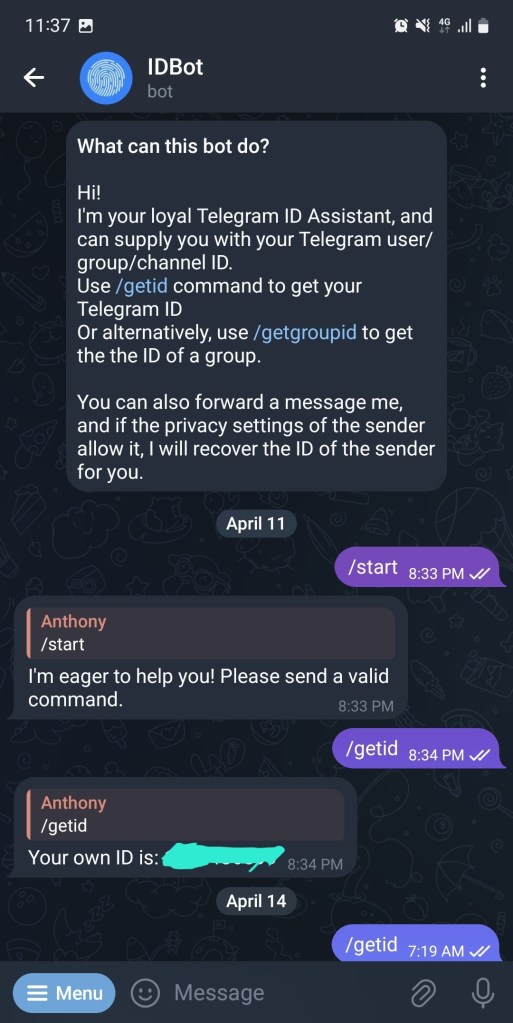
- Then search for “IDBot” , make sure the icon is a fingerprint image. ( refer to my pic below)
- Then key in “/getid” to obtain your personal account ID, keep it safely. (This chat ID will also be needed in the Arduino code)


Wiring diagram for the ESP32 and LEDs:
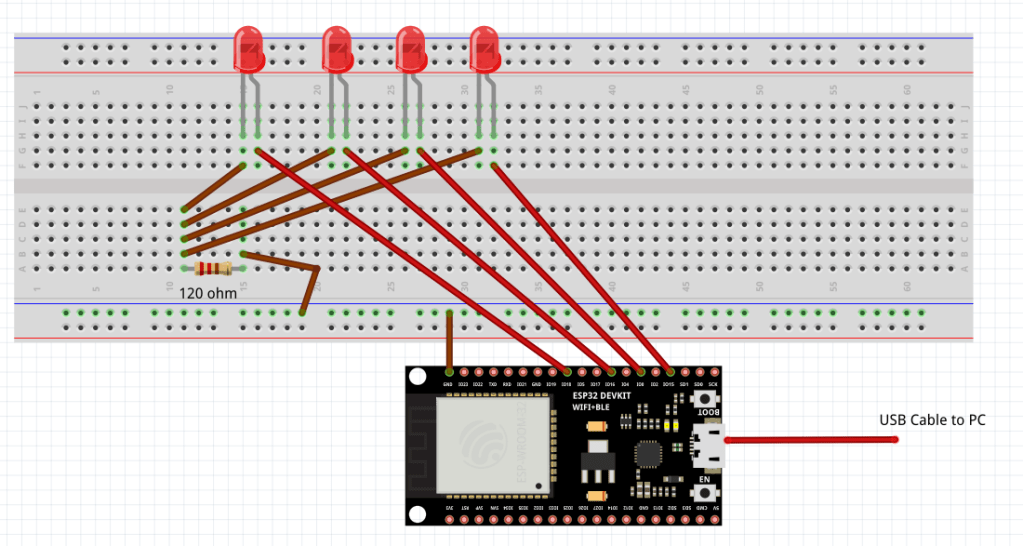

Things to note when writing and compiling the Arduino sketch:
- Choose the correct board and port number ( I am using ESP32 Dev Module).
- The Baud rate declared in setup function must tally with the Serial monitor baud rate ( mine is set at 115200).
- Make sure all the 4 libraries are installed. ( I think <WiFiClientSecure.h> is downloaded together with ESP32 board, you have to double check from the library manager that they are installed)
- And the version of Arduino IDE cannot be too old ( for me 1.8.xxx version does not work). I have to uninstall the old IDE and reinstall the latest version( version 2.3.2) at the time of this project.
- I am using IO pin 15, 0, 16 and 18. Due to wiring accessibility, you can change accordingly in your wiring and also in the code. (see above pic)


The Arduino Code:
#include <WiFi.h>
#include <WiFiClientSecure.h>
#include <UniversalTelegramBot.h>
#include <ArduinoJson.h>


// Enter your Telegram bot token and chat ID:
#define botToken "xxxxxxxxxxxxxxxxxxxxxxxxxxxxxxxx"
#define chatID "xxxxxxxxxxxx"

#define LED1 15
#define LED2 0
#define LED3 16
#define LED4 18


// Your WIFI connection SSID and Password:
char* ssid = "XXXXXXXX";
char* password = "XXXXXXXXXX";


WiFiClientSecure client;
UniversalTelegramBot bot(botToken, client);

int bot_delay = 1000;
unsigned long lastRun=0;

void processMessages(int numNewMessages)
{
    Serial.println("Handling New Message");
    Serial.println(String(numNewMessages));
    Serial.println("test");

  for (int i = 0; i < numNewMessages; i++)
    {
        // Chat ID of the requester:
      String chat_id = String(bot.messages[i].chat_id);
      Serial.println(String(bot.messages[i].chat_id));
      Serial.println(chat_id);


    if (chat_id != chatID)
        {
            bot.sendMessage(chat_id, "Unauthorized user", " ");
            continue;
        }

    // Print the received message:
    String user_text = bot.messages[i].text;
    Serial.println(user_text);

    String your_name = bot.messages[i].from_name;
    Serial.println(your_name);

    if (user_text == "/start")
    {
      String startMessage = "Hello, " + your_name + ".\n";
      startMessage += "Choose from the following commands:\n";
      startMessage += "(replace x with LED number 1~4)\n";
      startMessage += "Send /xon to turn LEDx ON \n";
      startMessage += "Send /xoff to turn LEDx ON \n";
      startMessage += "Send /alloff to turn all LEDs off \n";
      startMessage += "Send /status to check LED states \n";
      bot.sendMessage(chat_id, startMessage);
    }

    if (user_text == "/1on")
    {
        bot.sendMessage(chat_id, "LED 1 turned on");
        digitalWrite(LED1, HIGH);
    }

    if (user_text == "/1off")
    {
        bot.sendMessage(chat_id, "LED 1 turned off");
        digitalWrite(LED1, LOW);
    }

    if (user_text == "/2on")

    {
        bot.sendMessage(chat_id, "LED 2 turned on");
        digitalWrite(LED2, HIGH);
    }

    if (user_text == "/2off")
    {
        bot.sendMessage(chat_id, "LED 2 turned off");
        digitalWrite(LED2, LOW);
    }

    if (user_text == "/3on")
    {
        bot.sendMessage(chat_id, "LED 3 turned on");
        digitalWrite(LED3, HIGH);
    }

    if (user_text == "/3off")
    {
        bot.sendMessage(chat_id, "LED 3 turned off");
        digitalWrite(LED3, LOW);
    }

    if (user_text == "/4on")
    {
        bot.sendMessage(chat_id, "LED 4 turned on");
        digitalWrite(LED4, HIGH);

    }

    if (user_text == "/4off")
    {
        bot.sendMessage(chat_id, "LED 4 turned off");
        digitalWrite(LED4, LOW);
    }

    if (user_text == "/alloff")
    {
        bot.sendMessage(chat_id, "Turning all LEDs off");
        digitalWrite(LED1, LOW);
        digitalWrite(LED2, LOW);
        digitalWrite(LED3, LOW);
        digitalWrite(LED4, LOW);
    }

    if (user_text == "/status")
    {
      if (digitalRead(LED1))
        {
          bot.sendMessage(chat_id, "LED1 is on");
        } else
        {
            bot.sendMessage(chat_id, "LED1 is off");
        }
      if (digitalRead(LED2))
        {
          bot.sendMessage(chat_id, "LED2 is on");
        } else

        {
            bot.sendMessage(chat_id, "LED2 is off");
        }
      if (digitalRead(LED3))
        {
          bot.sendMessage(chat_id, "LED3 is on");
        } else
        {
          bot.sendMessage(chat_id, "LED3 is off");
        }
        if (digitalRead(LED4))
        {
          bot.sendMessage(chat_id, "LED4 is on");
        } else
        {
          bot.sendMessage(chat_id, "LED4 is off");
        }
      }
    }
}

void setup() {

   Serial.begin(115200);

    pinMode(LED1, OUTPUT);
    pinMode(LED2, OUTPUT);
    pinMode(LED3, OUTPUT);
    pinMode(LED4, OUTPUT);

    digitalWrite(LED1, LOW);
    digitalWrite(LED2, LOW);

    digitalWrite(LED3, LOW);
    digitalWrite(LED4, LOW);

    // Connect to Wi-Fi
    WiFi.mode(WIFI_STA);
    WiFi.begin(ssid, password);

    // Add root certificate for api.telegram.org
    client.setCACert(TELEGRAM_CERTIFICATE_ROOT);
    while (WiFi.status() != WL_CONNECTED)
    {
        delay(1000);
        Serial.println("Connecting to Wi-Fi…");
    }

    // Display IP address used by ESP32
    Serial.println(WiFi.localIP());


}


void loop() {

 if (millis() > lastRun + bot_delay)
    {
        int numNewMessages = bot.getUpdates(bot.last_message_received + 1);
        while (numNewMessages)
        {
            Serial.println("Received message");
            processMessages(numNewMessages);
            numNewMessages = bot.getUpdates(bot.last_message_received + 1);
        }
        lastRun = millis();
    }

}
 Welcome...enjoy coding, Electronics, IOT or data mining? Thank you for visiting my blog.